Collocation Network
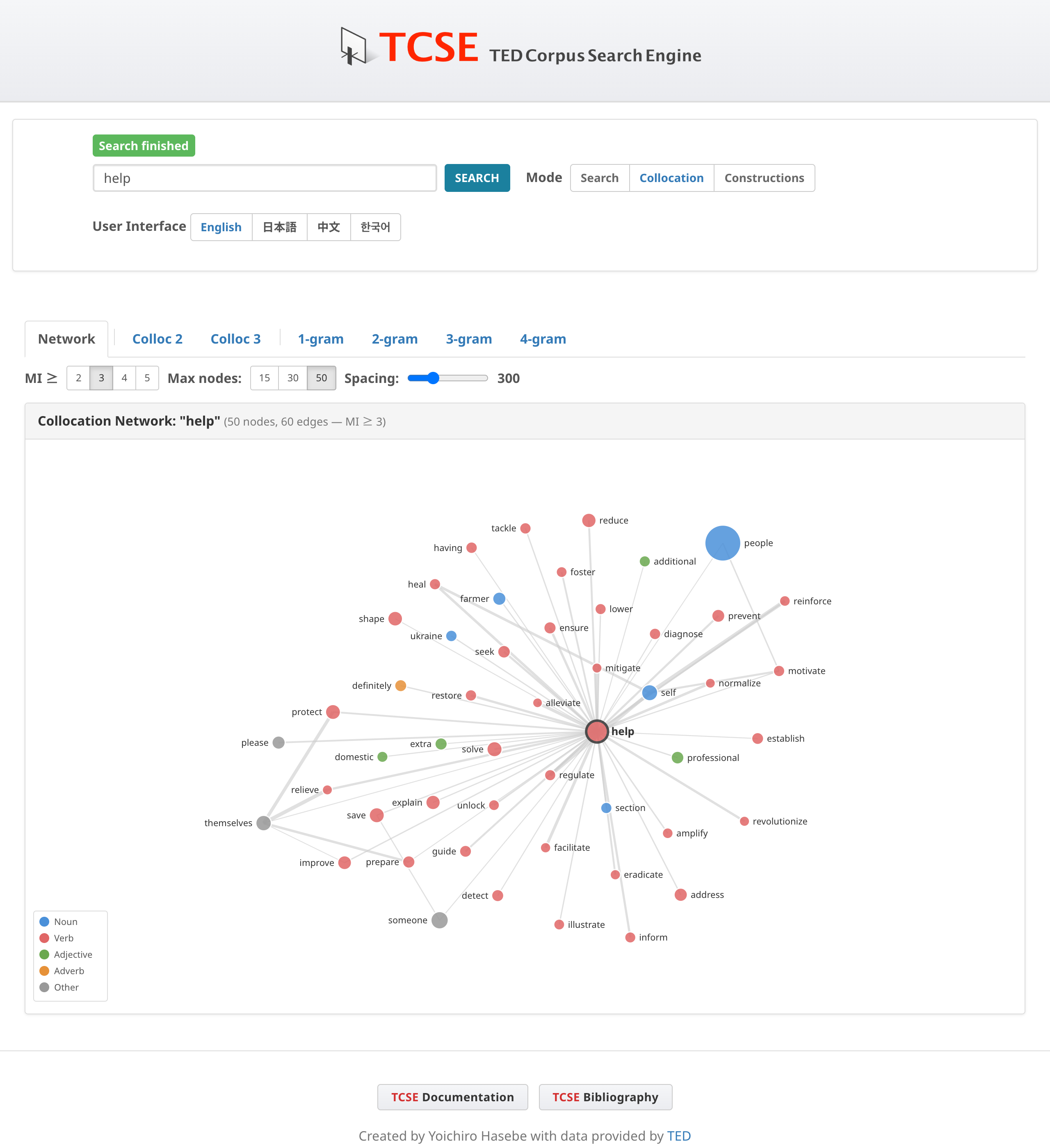
The Network tab in Collocation mode provides an interactive visualization of word co-occurrence relationships using a force-directed graph. When you search for a word, the Network tab is shown by default if sufficient collocation data is available; otherwise, the display automatically falls back to the 2-gram tab.
How to access
- Click on Collocation to switch to Collocation mode
- Enter a search word and click Search
- The Network tab is selected by default
Understanding the graph
- Nodes represent lemmas (base forms of words). For example, searching for "makes" will show the lemma "make", aggregating all inflected forms (make, makes, made, making).
- Edges connect words that frequently co-occur in the corpus. Thicker edges indicate higher MI (Mutual Information) scores.
- Node size reflects the word's overall frequency in the corpus.
- Node color indicates the part of speech:
| Color | Part of speech |
|---|---|
| Blue | Noun |
| Red | Verb |
| Green | Adjective |
| Orange | Adverb |
| Gray | Other |
Controls
MI threshold
The MI ≥ buttons (2, 3, 4, 5) control the minimum Mutual Information score required for an edge to be displayed. Higher thresholds show only the strongest collocations. When the default MI ≥ 3 yields fewer than 5 nodes, the system automatically lowers the threshold to MI ≥ 2.
Max nodes
The Max nodes buttons (15, 30, 50) control the maximum number of words displayed in the graph. Fewer nodes produce a cleaner, more focused visualization.
Spacing
The Spacing slider (100–800) adjusts the repulsion force between nodes. Higher values spread nodes apart, reducing label overlap. Lower values produce a more compact graph.
Zoom
The Zoom slider (50%–200%) adjusts the magnification level of the graph. Drag the slider to zoom in or out. The current zoom percentage is displayed next to the slider.
Interaction
- Pan: Drag the background to move the entire graph
- Drag: Drag individual nodes to rearrange the layout
- Hover over a node to highlight its connections and show MI scores on edges
- Click center node (the search word): Navigate to a token search for
[lemma], showing all corpus examples - Click peripheral node: Open a modal showing co-occurrence patterns (2–4 grams) between the two words, sorted by frequency. Click a pattern row to search for those specific examples in the corpus
Filtering criteria
The network applies the following filters to select meaningful collocations:
- MI threshold: Minimum Mutual Information score (default ≥ 3, with automatic fallback to ≥ 2)
- Frequency: Minimum co-occurrence frequency ≥ 3
- Talk count: Talk count ≥ 3 — a collocation must appear in at least 3 distinct TED Talks to be included. The value compared against the threshold is the largest talk count among the grouped rows, as on the Colloc tabs
The talk count filter uses the document-level structure of the corpus: a collocation attested in several talks is better evidence of a general pattern than one concentrated in a single talk. Note that talks are not a substitute for speakers. Some speakers have given more than one TED Talk, and the filter does not distinguish those talks from talks by different speakers.
Stop words
The following categories of function words are excluded from the network as collocates (but can still be searched as the center word):
- Articles: the, a, an
- Be verbs: is, was, are, were, be, been, being
- Prepositions: of, in, to, for, on, with, at, by, from, about, into, over, after, before, between, through, during
- Conjunctions: and, or, but, if, so, than
- Negation: not
- Auxiliaries: has, have, had, do, does, did, will, would, can, could, may, might, shall, should, must
- Pronouns: it, its, this, that, there, their, they, them, he, she, him, her, his, we, our, you, your, who, which, what, how
- Quantifiers/determiners: all, some, no, any, each, much, many, more, most, such, only
- Numerals: one through ten, first, second, third, last, next
- High-frequency adverbs: also, just, even, still, back, up, out, then, too, when, where, here
Content words (nouns, verbs, adjectives, most adverbs) are not excluded, as they may form meaningful discourse-level collocations.
Lemma-based aggregation
The network uses lemma-based aggregation: all inflected forms of a word are merged into a single node. For example:
- "make", "makes", "made", "making" → single node "make"
- "great", "greater", "greatest" → single node "great"
This combines related forms so that the network reflects lemma-level co-occurrence rather than individual surface forms.
Tips
- Start with a content word (noun, verb, adjective) for the most informative networks
- Use the Spacing slider to reduce label overlap in dense networks, and the Zoom slider to adjust magnification
- Click peripheral nodes to explore co-occurrence patterns, then click a pattern to see corpus examples
- The network complements the Colloc tabs by providing a visual overview of a word's collocational profile